In this video
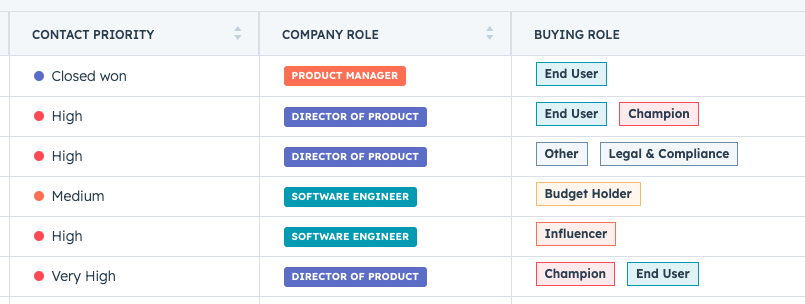
HubSpot introduces a small but powerful update: you can now assign colors to property options. This helps you gain insight into your data at a glance and act faster.
🔹 Example 1: Use red, yellow, and green for a custom ‘status’ property, so you can immediately see which deals are stuck.
🔹 Example 2: Give lead types a unique color, so you can quickly distinguish between inbound and outbound leads.
🔹 Example 3: Color code buying roles (e.g. decision maker in blue, influencer in orange, user in green), so you can see at a glance who you are addressing in a deal.
Want to see how it works? Our colleague Ruben made a video about it!
Check it out via Settings > Properties > Edit Property > Field Type > Option display mode and discover the possibilities.





.png)