










Inbound Marketers understand that SEO changes constantly. Therefore, at Vet Digital we remain on top of new developments in content and search. Pillar pages were presented by HubSpot as a solution for SEO. We went to HubSpot to learn all about the ins and outs of pillar pages and topic clusters. In this blog article I explain how SEO strategies have developed over time, what a pillar page is, and why you should use it for your Inbound Marketing strategy.
Developments in SEO via search engines
The biggest development in SEO is that search engines understand how people think and talk. Nowadays, search engines can understand the intent and context behind a search query much better than before, without explaining what you are looking for.
Google has changed its algorithm so that it can determine how useful and relevant the content is for the reader. For example, spoken search queries are becoming more popular. With that, there is a shift from broad search terms to specific long-tail search terms.
Example: 10 years ago you would enter: 'Eindhoven restaurant'. Even though you are actually asking a question: 'what is currently the best place to eat near me?'. Now, Google understands this search query and shows you the most relevant restaurants that are open near you.
The reason why pillar pages work so well: Topic Clusters
Hence, Google becomes much smarter in offering content that someone is searching for. People search more on long-tail keywords, but how do you react to that trend?
As an Inbound Marketeer you create content. A lot of content. This way, you can offer search engines the right information. However, all that content is published to individual blog articles and pages surrounding a specific keyword, which makes it difficult for readers to ascertain whether you have more information on the topic. In addition, when you write different blog posts about a similar topic your URL's are competing with each other.
The solution to this is to make topic clusters: you choose a broad topic to which you link content that cater to long-tail-keywords. This way, more of your website pages will be ranked in Google. With the help of the option 'Content Strategy' in HubSpot you build a topic cluster surrounding a specific topic.
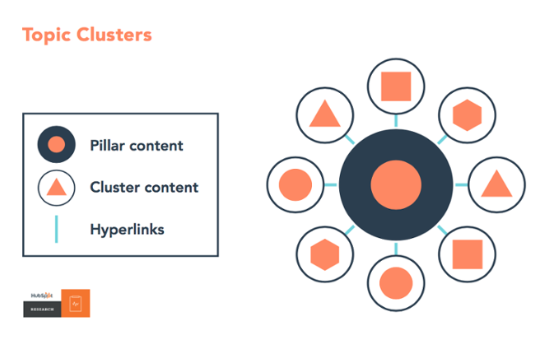
What is a pillar page?
Topic clusters are pieces of content that all address the same topic. This content appears on different pages but is linked together. This creates a cluster of content about one main topic: the pillar page.
The term "pillar" already suggests it: it's one of the pillars for your company's positioning and how you want to be found. This main topic can easily be divided into various subtopics, creating a cluster of information around the main topic.
A pillar page is the base page of a topic cluster. It's the page that covers the main topic and contains information about all the subtopics.
However, this information isn't very detailed and primarily answers more general questions about the main topic. More detailed information about the subtopics is explained on separate pages. These pages always link back to the pillar page.
Parts of a pillar page
A pillar page is divided into the following parts:
-
-
A short introduction about your central topic;
-
Different information from blog articles and pages that delve deeper into certain components of your central topics (your subtopics);
-
Links to content that provides more detailed information about the topic;
-
Hyperlinks in the shape of a menu at the top of the page that send you to different sections on the page.
-
This information, however, isn't very detailed and primarily answers more general questions about the main topic. More detailed information about the subtopics is explained on separate pages. These pages always link back to the pillar page.
Why are pillar pages so important for your content strategy?
Every marketer who wants to rank high in Google on an organic search term, should build a pillar page from their existing website content. Next to search results, the pages contribute to a positive user experience of the website. A pillar page has the following advantages:
- Your public can easily navigate through your website and find information quickly about a particular topic
- You show that you are knowledgeable about the topic
- Google values websites that use good and structured pillar pages
- Google values you as an expert on a certain topic and will prefer your website over others
“HubSpot has generated at least 50% more organic search results from the moment that they started clustering content by topic and optimizing old posts."
Creating an Effective Pillar Page
Before you start creating pillar content, it's important to research which words, terms, or queries are being searched for in Google that relate to your business.
Is there genuine interest in the topic you want to cover? If so, you'll see this reflected in the search volume, and you can get started. The following steps will help you set up the pillar page and topic clusters.
1. Determine the Main Topics
To create an effective topic cluster, you need to start with several main topics. These could be topics you want to be known for, or topics your target audience is searching for.
Group these topics into broad main topics that can accommodate various subtopics. Make sure the topics aren't too broad, but also not too specific.
2. Create a Topic Cluster
Break down the main topics, the content pillars, into various relevant subtopics. This will help you create the idea for your topic cluster. A prerequisite for a subtopic is that it shouldn't be dependent on the main topic.
It should support the main topic, but be relevant enough to publish on its own. When developing subtopics, it can be helpful to consider what questions your target audience has about the main topic.
3. Create Content
Now it's time to create content. This can be done in various ways, such as blogs, infographics, and videos. You might already have content related to the main topic.
In that case, it's not necessary to create new content; you can simply use your existing content and adapt it if necessary. Also, remember to link from this content to the pillar page and from the pillar page back to this content.
4. Link to the Pillar Page from All Subtopics
A pillar page is usually not found from the site's navigation. It's used purely for search engine visibility and to provide visitors with a wide range of information.
To make the topic cluster complete and effective for both users and search engines, it's important to link the pillar page to all subtopics. This is done through hyperlinks on each page.
By linking from subtopics to the main topic, you let website visitors know that more content is available. This way, you retain more visitors to your website.
Topic clusters in HubSpot
Pillar pages are therefore a good way to optimize your website. You can easily develop and maintain this in HubSpot: a CRM and marketing tool in one.
HubSpot's topic cluster feature offers a way to easily manage topic clusters. You can use the pillar pages, the focus keyword the content is written for, and the corresponding link to the page.
You can then find related topics and keywords for which you can create content. HubSpot's AI tool already provides you with topic suggestions for which you can create content, helping you rank for new, relevant keywords in SEO. The tool enables monitoring progress and measuring results.
HubSpot topic clusters are included in:
- HubSpot Marketing Hub, for both the professional and enterprise plans
- HubSpot Content Hub professional and enterprise
- Legacy Marketing Hub basic
More information about pillar pages?
Are you enthusiastic now that you know more about pillar pages and are you curious how you can apply pillar pages to your content strategy? Contact us to receive free advice!