









AI is everywhere. But fair is fair: for many teams, it still remains a bit of a blur. What tools do you choose? What happens to your data? And how do you make it concrete enough to save time with it tomorrow?
During our webinar "build your AI agents in HubSpot," we showed how HubSpot's Breeze Studio finally makes the step to practical AI approachable. Not as a separate tool next to your stack, but simply in your HubSpot portal. With your data, your workflows and your governance.
In this blog, we take you through what AI agents are, why this is a game changer and how you can deploy them today.
Why AI in your HubSpot portal is a game changer
Many organizations have started experimenting with AI in recent months (or years). Often with external tools. And that works fine for single tasks, until you run into three things:
- You have to repeatedly prompt and explain what you want
- You work outside your own ecosystem, which means CRM data doesn't automatically participate
- Privacy and security become an obstacle, especially once you want to use real customer data
HubSpot is now tackling this differently. With Breeze Studio, AI comes not as an additional platform, but as part of HubSpot. And with that, the barrier to entry suddenly becomes much lower.
What exactly is an AI Agent?
An AI agent is best thought of as a digital colleague. Just like a new colleague, you have to "onboard" an agent. You give it:
- The right data
- The right instructions
- Clear boundaries: what is allowed and what is not allowed
- And where is another human needed
And exactly that is what Breeze Studio makes possible. You choose an agent, add extra instructions, assign tools and rights, and decide who is allowed to use it.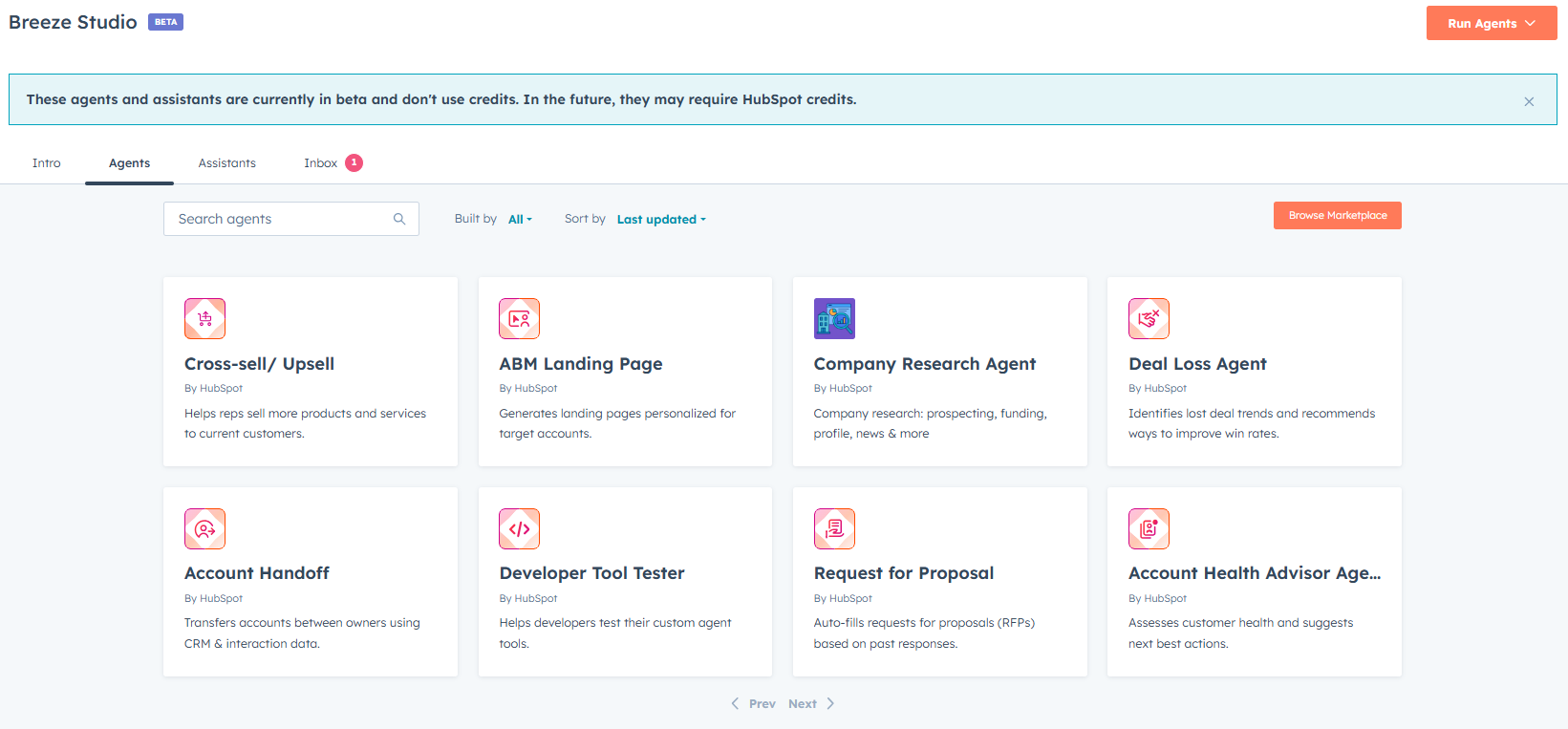
Breeze Studio in a nutshell: Here's what you can do with it
Breeze Studio is currently still in beta, but its functionality is already impressive. In the agent marketplace, you choose from pre-made agents offered by HubSpot, such as:
- Customer handoff agent (transfer from sales to onboarding/customer success)
- RFP agent
- Cross- and upsell agent
- Company research agent,
- And lots of other agents (check them out here)
Next, set up the agent for your organization. Follow the steps:
1) You can add additional instructions
The basis of the agent is fixed, but you can add "extra instructions" on top of it. That's exactly where you make it your own.
Example from the webinar:
For a customer handoff, you don't just want an internal transfer, you want to automatically send an email to congratulate the customer on signing the offer. Or you want an additional note in the CRM with the most important context for the customer team. You simply add that now.
2) You decide which tools the agent can use
An agent can do things. But you decide what. For example, you can give permission to:
- access CRM records
- use web browsing
- create a note
- create tasks in HubSpot
The latter is important because this makes AI not only advisory, but also executive.
3) You can link knowledge, including CRM objects
In addition to files, you can also add CRM objects as knowledge. This allows an agent to base its output on your internal context and data.
From Manual AI to Ambient Agents
One of the biggest steps HubSpot is now taking is automation. Namely, you can make agents "ambient": agents that start autonomously based on a trigger, without anyone having to press a button.
Think of triggers like:
- Call ended
- Deal to closed won
- New inbound request via marketing
And from then on, the agent can perform its task from A to Z. For example: transfer scheduling, summarizing/noting, preparing tasks and informing the team.
In the webinar, we showed a use case that our colleague Raymond set up. Namely, a customer wanted to know immediately when new prospects arrived:
- what kind of organization this is
- does it fit within our target group
- how high does this company score on relevance
- and how do we ensure that all the insights land directly in the CRM?
Raymond used the standard Research Agent for this and added additional instructions such as:
- Use only publicly available data and the official website
- Rate only if you are 100% sure
- Log everything in HubSpot
- Create follow-up tasks if the score is high enough
The output went beyond just a summary. The agent also independently created a task in HubSpot and recorded the main reason for the score. And this is exactly where the win is: your sales team no longer has to research, copy-paste and create tasks. The agent is already doing it, based on your rules.
Agents vs Assistants: what's the difference?
In Breeze Studio, you'll see assistants in addition to agents. The difference is simple: Agents perform tasks (and can even automate them). Assistants are your real-time co-pilot in the moment.
An example we showed is a sales coach assistant. You ask a question, the assistant pulls context from CRM and immediately gives you concrete recommendations and next steps. Think of applications such as:
- Preparing for customer calls
- Bell scripts based on CRM context
- Selecting most valuable prospects based on your own criteria
What about data security and privacy?
Logically, this is a big question. Especially if you give agents access to customer data. In the webinar, we mentioned that HubSpot is transparent about this and refers to the Trust Center with documentation on data agreements and processing.
Important detail: HubSpot has agreements with OpenAI stating that data may not be used for training and will be destroyed. In addition, enterprise functionality allows you to mark "sensitive data" so that certain properties are not accessible to Breeze.
What can you do today?
Breeze Studio is still beta at the time of writing (Jan 2026), but you can already start testing. And that's exactly the right step.
Our tips:
- Choose one process on which your team loses a lot of time
- Choose an agent that fits it (prospecting, handoff, research)
- Add additional instructions with clear rules
- Test it 30 to 50 times before putting it broadly live
AI continues to have a chance of "hallucinations," but with good instructions and clear boundaries, you greatly reduce those risks.
Want to test Breeze Studio for yourself?
Breeze Studio is being rolled out in phases. If you already see the beta in your portal, you can activate it. If not, we can help you get access and immediately choose the right use cases for your organization.
Want to spar about your first agent or see which processes are producing the fastest results? Send us a message and we'll schedule a short discovery to get you started.