










The December 2025 HubSpot updates are all about more control over your data, smarter interactions and less manual work. From improvements in email previews and forms to smarter CRM and Service Hub functionality, these are updates you'll notice immediately in your daily work with HubSpot. In this blog, we'll list all of December's updates for you and explain what they mean in practice.
1. More control over your email preview text
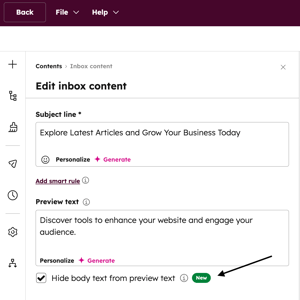 You can now set the inbox to show only the preview text you set. HubSpot no longer automatically populates the preview with content from your email.
This is especially interesting because the inbox preview often determines whether someone opens your email. Automatically generated text frequently creates cluttered or unclear previews. With this update, you control exactly what recipients see.
A practical example:
You send a product update and want only "New integration available" to be visible in the inbox, without additional sentences from the email body.
This update is available for all Hubs and tiers.
2. Enhanced multi-step form logic: hide & show steps
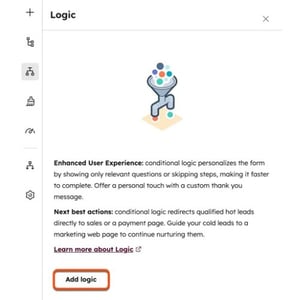 Multi-step forms get enhanced conditional logic. You can now hide or show steps based on previous answers. This replaces the old "skip to step" functionality.
This makes for shorter and more relevant forms, reducing visitor abandonment and increasing conversion rates. Visitors only see questions that apply to them.
A practical example:
Someone indicates they are already a customer. You automatically show a shortened form with service questions and skip commercial questions.
This update is available for Content and Marketing Hub Pro and above.
3. Fixed promts available in Custom Assistants
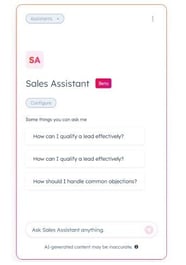 You can now add fixed, clickable prompts to Custom Assistants. Users no longer have to figure out for themselves what to ask the AI.
This lowers the barrier to actually using AI. Many teams want to work with AI, but aren't sure where to start. Conversation Starters help with that. Think of an internal sales assistant with starters like "Summarize this deal record" or "What follow-up actions do you recommend?"
This functionality is available for all Hubs starting with Starter.
4. Close chat while ticket remains open in Help Desk
Support agents can now close a live chat without automatically closing the associated ticket. This is especially useful for questions that cannot be solved immediately. The customer knows where they stand and the support team maintains an overview in the follow-up.
A practical example:
A customer needs to inquire about something internally. The chat is closed, the ticket remains open and support can follow up later in a targeted manner.
This update is available for Service Hub Pro and above.
5. Customer Agent can view and edit contact properties.
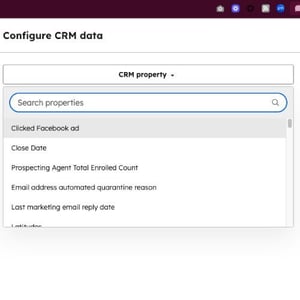 The Customer Agent now has direct access to contact properties in the CRM and can also edit them during a conversation. This provides more context and more personalized service. Support agents no longer need to have information modified or transferred afterwards.
A practical example:
During a support call, a preference or status is immediately updated in the contact record so that everything is immediately correct.
This update is available for all Hubs Pro and above.
6. Lead scores now also show negative values
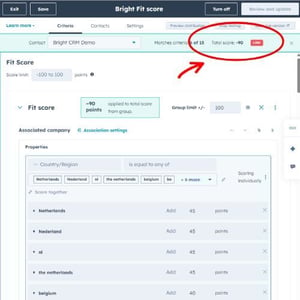 Lead scores that fall below zero are now actually displayed and counted as negative, making your scores more realistic and more in line with the actual fit and intent of leads. Negative behavior or poor match no longer disappears into a score of zero.
A practical example:
A lead visits many pages, but falls outside your target audience. Negative fit points put this lead lower on Sales' priority list.
This update is available for Marketing and Sales Hub Pro and above.
7. Fix 'property edits' in bulk
Bulk property changes made via workflows or imports can now be easily restored. This saves a lot of time and avoids complex workarounds when something goes wrong. You no longer have to export and re-import to correct errors.
A practical example:
A workflow accidentally overwrites hundreds of lifecycle stages. With this feature, you fix this quickly and in a controlled manner.
This update is available for all Hubs Enterprise.
8. CRM activities available in Data Model Builder
CRM activities are now visible and configurable within the Data Model Builder, giving you a more complete picture of your data model, including interactions such as calls, meetings and emails. This helps to better structure and understand your CRM.
A practical example:
you see how activities relate to other objects and can better adjust your data model accordingly.
This update is available for all Hubs and tiers.
Conclusion
December's HubSpot updates show a focus on control, data quality and practical AI applications. If you work a lot with forms, lead scoring, support or CRM automation, then these are updates you definitely want to check out and activate.
Want to know what these updates mean specifically for your HubSpot environment or how to deploy them smartly within your processes? If so, we'd love to think with you. Get in touch with us here!